

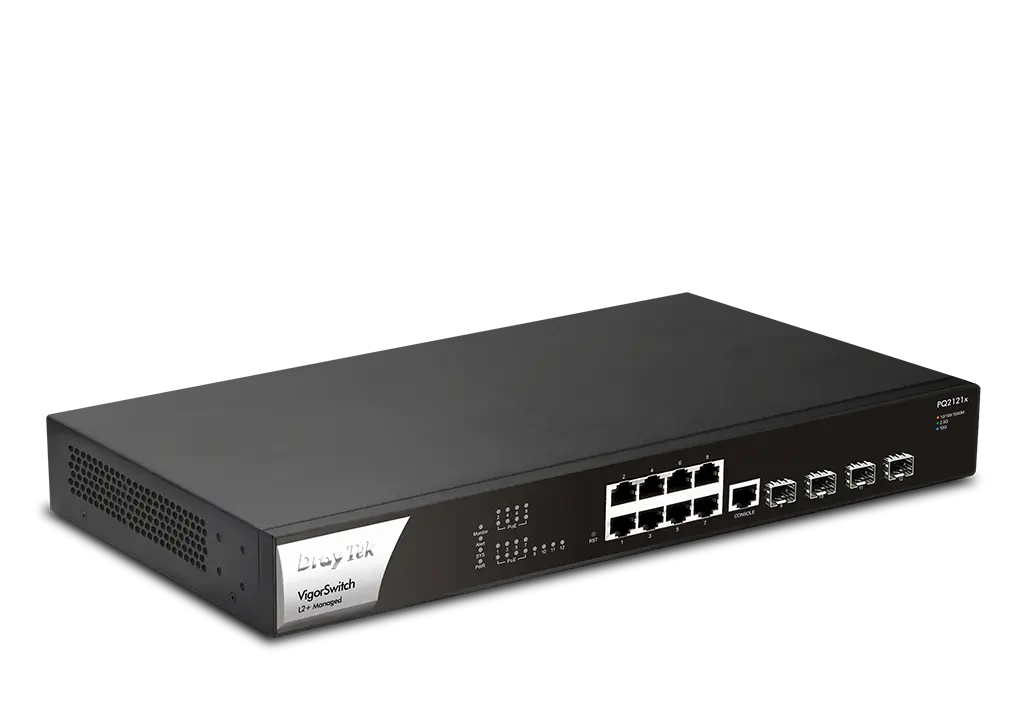
DrayTek VigorSwitch PQ2121x Layer 2+ Managed PoE Switch
$497.95
PoE+ (140W) L2+ Managed Switch with 4 x 10GbE SFP+ slots, 8 x 2.5GbE ports with PoE+ ports, 1 x Console port, Auto Surveillance & Voice VLAN, ONVIF-Friendly and Central Switch Management
L2+ Managed 2.5GbE Switch with 8 x 2.5GbE PoE+ ports (140W total), 4 x 10GbE SFP+ slots, and 1 x Console port
The VigorSwitch PQ2121x is a Layer 2+ Managed switch with 8 x 2.5GbE PoE RJ-45 ports and 4 x 10GbE SFP+ ports for connecting optic fibre modules or DAC cables.
Each of the eight 2.5 Gigabit Ethernet ports of the VigorSwitch PQ2121x supports 802.3at and 802.3af PoE standards, providing up to 30W of power per port for a total power budget of 140 watts. Network connectivity and reliability are enhanced with advanced Layer 3 features plus a DHCP server and VLAN routing.
The PQ2121x enables full WiFi 6 capability when deployed with WiFi 6 VigorAPs like VigorAP 1062C.
Interface

Key Features

PoE (Power over Ethernet)
Deliver power and data over one ethernet cable, turn on/off the PoE device periodically with PoE Schedule.

QoS (Quality of Service)
Improve the performance of critical traffic by prioritising it with CoS, DSCP, and IP Precedence tag.

Ping Device Check
Enable Ping check to selected devices to keep monitoring on their status. If ping timeout, power cycle (if PoE enabled) the port and/or send out mail alert.

ONVIF-Friendly
Recognise ONVIF devices, display surveillance topology, provide UI for video streaming and device maintenance. Learn more

2.5GbE
Provides higher performance to WiFi 6 AP and other Ethernet devices.

IPv6 Ready
VigorSwitch PQ2121x supports IPv6 by offering MLD Snooping, IPv6 ACL, and IPv6 DNS Resolver.

10G SFP+
Provides 10G-capable fiber SFP+ ports for aggregation or uplinking to the core switches.

Web-Based GUI

Wire-Speed VLAN Routing
Improve overall network performance by using VigorSwitch PQ2121x to route the inter-VLAN traffic directly and offload the router.

Multiple Admin Accounts
Multiple Admin accounts with two levels of administrator privilege.

Auto Surveillance & Voice VLAN
Recognise traffic from IP cameras and IP phones automatically and add CoS tag for QoS prioritisation.

Central Switch Management
Set up VLANs easily from the router and get a centralised hierarchy view of the switches. Learn more

IP Conflict Prevention
Improve network stability by avoiding IP conflicts caused by a misconfigured or malicious host. Learn more
ONVIF-Friendly
Recognise ONVIF devices in different VLANs, display surveillance topology, provide UI for video streaming and device maintenance

Centralised Hierarchical View
The VigorSwitch PQ2121x automatically detects ONVIF devices and displays the topology of connected IP cameras and NVRs.
Image Viewing
Images filmed by IP cameras can be viewed directly within the VigorSwitch PQ2121x web UI.
Device Management
Basic configuration/maintenance tasks for ONVIF devices such as remote reboot, factory reset and changing network settings can all be done remotely from the VigorSwitch PQ2121x web UI.

ONVIF Snapshot Alert
Locating Non-Responding IP Cameras Made Easy

Managing a network of IP cameras across different locations is difficult, as when any of the cameras stop functioning, there is no easy way to detect or revive it. To help with this problem, the VigorSwitch PQ2121x regularly pings ONVIF IP cameras and takes snapshots from them periodically. If one IP camera stops responding, an email alert is sent with the latest snapshot from the camera.
With PoE VigorSwitch models, the switch can also provide first aid by automatically power cycling the particular port to reboot the camera.
IP Conflict Detection & Prevention
Conflict Detection
The VigorSwitch constantly checks the network environment and notifies the administrator of any IP conflicts.
Conflict Prevention
For a more stable network, the VigorSwitch detects misconfigured or malicious IP hosts and blocks them before damages are done.

Device Check

Ping Check for LAN Devices
A VigorSwitch can continuously ping the LAN devices, and when the device stops responding to the ping, it will instigate a PoE cycle to the associated port (PoE model only) and/or send an email alert to the administrator.
LAN Management
An all-in-one management platform for Vigor devices on the LAN side.
Automatic Device Discovery
Connect a Vigor Switch or AP to the LAN side of the Vigor Router, and the router will auto-discover the device to allow it to be managed.
Provisioning
Basic settings may be done on the Vigor Router, and then provisioned to the managed Vigor Switches or APs.
Monitoring
The Vigor Router provides a centralized view of managed devices, so you can monitor and check the status of Vigor Switches or APs connected.
System Maintenance
Perform factory resets, save/restore configuration backups, or trigger reboots remotely from the Vigor Router’s interface. There is no need to log in to each device’s management page.

Management Solution
All-in-One Management |
|---|
Vigor Router SWM

- Auto-Discovery
- Provisioning
- Monitoring
- Centralized Hierarchy View
- Reboot PoE Devices Remotely
- Quick VLAN Configuration