

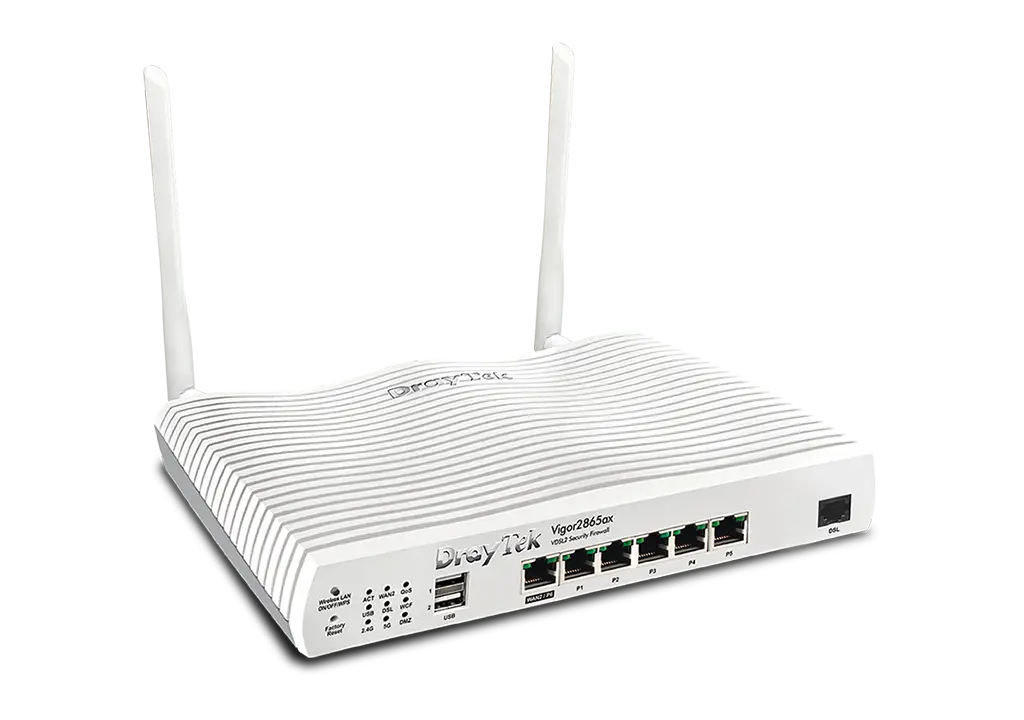
Draytek Vigor2865Vac VDSL2 35b Dual-WAN VPN Firewall Router
$428.37
Multi WAN Router with VDSL2 35b/ADSL2+, 1 x GbE WAN/LAN, and 3G/4G USB WAN port for Load Balancing and Fail-over, 5 x GbE LANs, Object-based SPI Firewall, CSM, QoS, 802.11ac (AC1300) WiFi, VoIP (2 x FXS), 32 x VPNs, 16 x SSL VPNs, and support VigorACS 2/3
- Multi-WAN with 1 x VDSL2 35b Supervectoring / ADSL2+ WAN port, 1 x configurable GbE WAN/LAN port, 2 x USB ports and 2 x Wi-Fi WANs (ac/Vac models)
- 1 x XDSL port and 1 x configurable GbE WAN/LAN port for Failover, Load Balancing and High Availability mode
- 2 x USB 2.0 ports for 3G/4G LTE USB modems, FTP server, network printer or thermometer
- 5 x Gigabit LAN ports with multiple subnets and 60,000 NAT sessions
- 32 x VPN tunnels (including 16 x OpenVPN/ SSL-VPN tunnels) with most security protocols
- Fast VPN throughput, VPN Load Balancing and backup for site-to-site VPN applications
- Hardware Acceleration and Hardware QoS for up to 8k NAT and routing connections, and 940Mbps (Single WAN) or 1.3Gbps (Multi-WAN) Firewall speed
- 16 x VLANs for secure and efficient workgroup management
- IPv6 & IPv4
- Up to 1022 IP addresses and 8 IP subnets
- Integrated IEEE 802.11ax (WiFi 6, AX3000) wireless Access Point; dual band; up to 2402 Mbps throughput (ax model)
- Integrated IEEE 802.11ac (AC1300) wireless Access Point; dual band; up to 867 Mbps throughput (ac/Vac models)
- High Availability mode
- Object-based SPI Firewall and CSM (Content Security Management) for network security
- VoIP (2 x FXS ports) for Vigor2865Vac
- Supports VigorACS 2 and VigorACS 3 Central Management Software for remote management
- SD WAN capability when used with VigorACS 3
- Central VPN Management for up to 8 remote Vigor routers Learn More
- Central AP Management for up to 20 Vigor Access Points Learn more
- Central Switch Management for up to 10 VigorSwitches Learn More
- 2 years back to base warranty
Multi-WAN VDSL2 35b/Ethernet Security Routers for SMB

Vigor2865ax
802.11ax (WiFi 6, AX3000)
The Vigor2865 series are VDSL2 35b/ADSL2+ security Firewall routers integrating a DSL modem which is compatible with variants of ADSL and VDSL, including profile 35b supervectoring. There is also a configurable Gigabit Ethernet WAN/LAN port for broadband connections to share the traffic load or serve as a Failover connection. A 3G/4G/LTE USB modem can also be attached to the USB ports of the router. The Vigor2865 series includes models with built-in 802.11ax (WiFi 6, AX3000)/ 802.11ac Wi-Fi and a VoIP gateway (Vac model).
VDSL2 35b
Download speed up to 300 Mbps
Up to 6 WANs for ac/Vac models
Load Balancing; NAT throughput up to 800 Mbps
32 x VPN tunnels
IPsec VPN throughput up to 300 Mbps
60k NAT sessions
Recommended for a network of up to 30+ devices

- 2 x USB 2.0 ports for 3G/4G LTE USB modems, FTP server, network printer or thermometer
- GbE LAN/WAN Switchable Port: 1x GbE RJ-45
- Fixed LAN Port: 5x GbE RJ-45
- 2 x VoIP FXS ports (Vac model)
- Fixed WAN Port: 1x RJ-11 for VDSL2 35b/ADSL2+
- Power On/Off Switch
- Power Input
Performance Comparison: Vigor2865 vs. Vigor2862
NAT throughput (1.6 times faster)
800 Mbps
Vigor2865 Series
500 Mbps
Vigor2862 Series
IPsec throughput (3.5 times faster)
300 Mbps
Vigor2865 Series
85 Mbps
Vigor2862 Series
SSL-VPN throughput (2.9 times faster)
130 Mbps
Vigor2865 Series
45 Mbps
Vigor2862 Series
Key Features

Hotspot Web Portal
Market your business and communicate with guests by offering hospitality Wi-Fi. Learn more

Wireless WAN (ac/Vac models only)
Get Internet access wirelessly from a Wi-Fi network, a mobile hotspot, or a personal hotspot set up on smartphones. Learn more

Bandwidth Management
Prevent one device using all the bandwidth with bandwidth limit policy, session limit policy, and QoS settings.

Load Balancing
Maximise throughput and reliability by using multiple Internet connections. Learn more

VoIP Friendly
The Vigor2865 Series can do port forwarding and reserve bandwidth for VoIP traffic automatically, making VoIP setup effortless. Setup Guide

35b Supervectoring Modem
Integrated VDSL modem, supporting VDSL2 profile 35b supervectoring.

Central AP Management
Use the Vigor2865 router as a wireless controller to maintain and monitor VigorAPs. Learn more

VPN (Virtual Private Network)
Build a secure and private tunnel from the LAN of the Vigor2865 Series to remote offices and teleworkers over the Internet. Learn more

WiFi 6 (ax model only)
Feature OFDMA and MU-MIMO technology to improve WiFi efficiency and deliver higher wireless speed.

SSL VPN
SSL VPNs work through firewalls providing secure remote access to any network environment. Learn more

Mesh (Wireless model only)
Easily link to other VigorAP to expand the wireless network. Learn more

Firewall & Content Filter
Filter web pages by URL keywords or web category to block access to insecure or inappropriate content.

Central Switch Management
Set up VLANs easily from the router and get a centralised hierarchy view of the switches. Learn more

DrayDDNS
Free DDNS service to access the router using a fixed hostname of your choice. Learn more
Hardware Acceleration
Without sacrificing traffic control features such as QoS, Bandwidth Limit, WAN Budget, Traffic Graph and Data Flow Monitor, Hardware Acceleration enhances performance for:
- NAT & routing connections
- QoS
- IPsec VPN

Hardware NAT & Routing
With Hardware Acceleration and Hardware QoS enabled, the router supports up to 8k NAT and routing connections, and firewall performance reaching 940Mbps on single WAN and 1.3Gbps combined performance on multi-WANs.
Dual WAN (Ethernet + xDSL)
1.6x Faster NAT Performance
1.3 Gbps
with Hardware NAT & Routing
800 Mbps
without Hardware NAT & Routing
Single Ethernet WAN
1.3x Faster NAT Performance
940 Mbps
with Hardware NAT & Routing
800 Mbps
without Hardware NAT & Routing
Hardware QoS
Hardware QoS allows prioritization of applications and services on DrayTek routers, to improve performance of critical applications such as VoIP, conferencing and video streaming, etc. Furthermore, it allows flexible bandwidth allocation to suit business requirements.

Dual WAN (Ethernet + xDSL)
1.6x Faster QoS Performance
1.3 Gbps
with Hardware QoS
700 Mbps
with Software QoS
Single Ethernet WAN
1.3x Faster QoS Performance
940 Mbps
with Hardware QoS
700 Mbps
with Software QoS
Hardware IPsec
While the Vigor2865 series already has improved IPsec performance over the previous Vigor2862 series, with Hardware Acceleration enabled, IPsec performance can now reach 800 Mbps. The first 16 tunnels are automatically accelerated on a first come first serve basis. If any drops out, a new tunnel will be put into the accelerator automatically to top off 16 accelerated tunnels.
2.8x Faster IPsec Performance
800 Mbps
with Hardware IPsec
300 Mbps
with Software IPsec

APP QoS
Application QoS allows prioritisation of applications and services on DrayTek routers to improve and enhance critical applications such as VoIP, conferencing and video streaming, etc. It also allow flexible bandwidth allocation to suit business requirements.
VoIP First
VoIP is always a top priority! The default VoIP port, UDP 5060 (configurable) has priority out-of-box with QoS.
Improve Experience for Business-Critical Apps
Select your business critical apps, and easily put them into QoS classes.
Flexible Bandwidth Allocation
Bandwidth will be reserved for high-priority classes, and can be used by low-priority classes when available.

Hotspot Web Portal
Market your business while offering free Wi-Fi
Wi-Fi Marketing
Redirect hotspot guests to the company homepage, online surveys, or display a promotion message.
Grow Customer Mailing List
Require guests to leave contact info or social media accounts before they can use the Internet services.

Various Authentication Types
A variety of login methods are supported to meet your business needs, including Facebook Login, Google Login, SMS PIN, Voucher PIN, and RADIUS.
3rd-Party Service Compliant
Supports external captive portal authentication so you can keep using the Wi-Fi marketing solution you prefer.
Data Quota Management
Bandwidth management is integrated into the Hotspot features to control the bandwidth and session usage of the Hotspot guests.
New OFDMA Feature for 802.11ax (WiFi 6) – Vigor2865ax only
Higher Transmission Efficiency with OFDMA
OFDMA has been used in LTE for many years, and is now available in 802.11ax for multi-user mode.
With legacy OFDM, each frame is transmitted across the entire channel width. When the transmission rate is low, this causes more latency and jitters and lower the overall efficiency.
OFDMA splits a single frame into groups of subcarriers, and each subcarrier can be sent simultaneously. With multiple access mode, it allows multiple users to transmit at the same time thus improving efficiency and enhancing user experiences in high density environments.
OFDM

OFDMA

802.11ax (WiFi 6) Downlink & Uplink MU-MIMO (Vigor2865ax only)

802.11ax (WiFi 6) BSS Colouring (Vigor2865ax only)
In traditional 802.11 Wi-Fi networks, access points are designed to wait and take turns if other signals of the same frequency are detected from adjacent access points. This sharing of a resource, in this case radio frequencies, is called a basic service set (BSS). 802.11ax adds Colouring to the BSS information being broadcast so that APs can use the same channel at the same time without having to take turns. This increases Wi-Fi efficiency, particularly in high density environments.
In the diagram here, AP1 and AP4 are using Channel 1 simultaneously, which normally means they would have to take turns if transmitting information at the same time. However, using BSS Colouring, the 2 APs can now transmit simultaneously without waiting.
An 802.11ax AP using BSS Colouring has the ability to change its BSS Colour if it detects another AP using the same BSS Colour on the same frequency.

AP-Assisted Roaming – built-in in selected Wi-Fi Vigor Routers and all Vigor Access Points

Extend Transmission Range
When a Wi-Fi client moves out of its effective transmission range which is defined by the Basic Rate and/or Received Signal Strength threshold, the AP forces the Wi-Fi client to pick up a nearby access point with stronger signals thereby extending the range.
Improve Data Rates
When the “Minimum RSSI with Adjacent AP” option is set, APs or routers on the same local subnet will exchange client information with each other and switch to the AP or router that has the strongest signal, ensuring that data rates can be as good as possible.
Better User Experience
Instead of ineffective transmission with low basic rates or RSSI, the better links provide better user experience while saving the airtime.
No Controller Required
Assisted Roaming is a built-in feature in all Vigor Access Points and a number of Wi-Fi routers; it saves the need for an ad-hoc wireless controller and is an ideal solution for simple network deployments.
Management Solution


| All-in-One Management | ||
|---|---|---|
| Mesh (ac model) Up to 7 APs | Central Switch Management Up to 2 Switches | Central AP Management Up to 2 APs |
| DiscoveryProvisioningMonitoringCentralised Hierarchy View | Auto-DiscoveryProvisioningMonitoringCentralised Hierarchy ViewReboot PoE Devices RemotelyQuick VLAN Configuration | Auto-DiscoveryAuto-ProvisioningMonitoringCentralised ViewAlarmReboot VigorAP RemotelyWi-Fi Client Load Balancing |


| Software Management | |
|---|---|
| VigorACS 2 | VigorACS 3 |
| ProvisioningMonitoringCentralised Hierarchy ViewAlarmReboot Vigor Devices RemotelyScheduled MaintenanceReport | Zero Touch Deployment & ProvisioningAuto VPNInterface Quality & SLAVoIP Optimization & MonitoringApplication VisibilityApplication Based SD-WAN PolicyCustomized Hotspot Page with MultilingualHotspot Clients AnalyticsACS Server Load Balancing / Failover |
In-the-Box

Vigor2865/ax/ac/Vac

Antenna x 2
(ax/ac/Vac model)

RJ-45 Cable
(Ethernet)

RJ-11 to RJ-11 Cable
(Annex A)

Power Adaptor

Quick Start Guide
| Dimensions | 10 × 10 × 10 cm |
|---|