


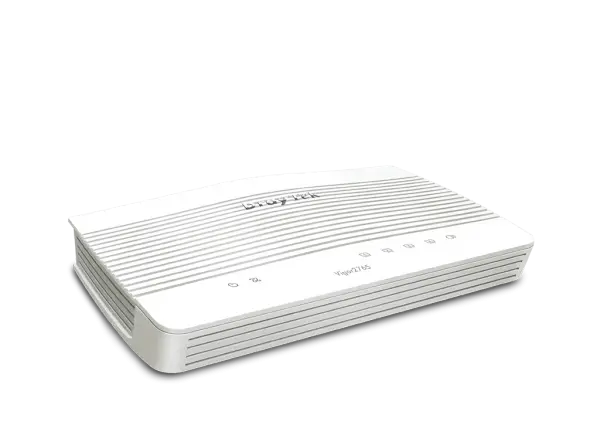
DrayTek Vigor2765 Series VDSL Modem Router
$344.00
Single WAN VDSL2 35b router, with 1 x congurable GbE WAN/LAN port and 3 x GbE LAN ports, supports SPI Firewall, 802.11ax/ac Wi-Fi, 2 x VPN tunnels including 2 x SSL VPN, and SOS/ROC for NBN Internet connection.
35b Supervectoring VDSL2/Ethernet Routers for Professionals

Vigor2765ax
802.11ax (WiFi 6, AX3000)
The Vigor2765 Series are 35b Supervectoring VDSL2 modem, firewall and VPN routers. All models have 4 x GbE LAN ports, one of which is switchable to be a backup Ethernet WAN interface. They’re highly configurable with an abundance of features including web content filtering, bandwidth limiting, QoS and lots more. Perfect for professional users who would like to take full control of the network. The series includes models with built-in 802.11ac Wave 2 Wi-Fi (ac/Vac model), 802.11ax Wi-Fi (ax model), and VoIP gateway (Vac model).
Interface

(Vac model)

(ax model)
Performance Comparison: Vigor2765 vs. Vigor2762
NAT throughput (1.5 times faster)
IPSec throughput (2.9 times faster)
SSL-VPN throughput (2 times faster)
Key Features

35b Supervectoring Modem
Integrated VDSL modem with 35b Supervectoring compatibility and VDSL2/ADSL2+ fallback.

DrayDDNS
Free DDNS service to access the router using a fixed hostname of your choice. Learn more

VPN (Virtual Private Network)
Build a secure and private tunnel from the LAN of the Vigor2765 Series to remote offices and teleworkers over the Internet. Learn more

Firewall & Content Filter
Filter web pages by URL keywords or web category to block access to insecure or inappropriate content.

VPN Matcher
Helps routers behind NAT to find each other and establish a LAN-to-LAN VPN. Learn more.

Hotspot Web Portal
Market your business and communicate with guests by offering hospitality Wi-Fi. Learn more

Bandwidth Management
Prevent one device using all the bandwidth by bandwidth limit policy, session limit policy, and QoS settings.

Central AP Management
Use the Vigor2765 Series router as a wireless controller to maintain and monitor the VigorAPs. Learn more

VoIP Friendly (Vac model)
Vigor2765 Series can do port forwarding and reserve bandwidth for VoIP traffic automatically, making VoIP setup effortless. Setup Guide

Mesh (Wireless model only)
Easily link to other VigorAP to expand the wireless network. Learn more.
Hardware Acceleration
Without sacrificing traffic control features such as QoS, Bandwidth Limit, WAN Budget, Traffic Graph and Data Flow Monitor, Hardware Acceleration enhances performance for:
- NAT & routing connections
- QoS

Hardware NAT & Routing
With Hardware Acceleration and Hardware QoS enabled, the router supports up to 4k NAT and routing connections, and firewall performance reaching 940Mbps on either xDSL WAN ( VDSL2 35b/G.fast) or Ethernet WAN.
Single WAN (Ethernet)
1.6x Faster NAT Performance
Hardware QoS
Hardware QoS allows prioritization of applications and services on DrayTek routers, to improve performance of critical applications such as VoIP, conferencing and video streaming, etc. Furthermore, it allows flexible bandwidth allocation to suit business requirements.

Single WAN (xDSL or Ethernet)
1.6x Faster QoS Performance
New OFDMA Feature for 802.11ax (WiFi 6) – Vigor2765ax only
Higher Transmission Efficiency with OFDMA
OFDMA has been used in LTE for many years, and is now available in 802.11ax for multi-user mode.
With legacy OFDM, each frame is transmitted across the entire channel width. When the transmission rate is low, this causes more latency and jitters and lower the overall efficiency.
OFDMA splits a single frame into groups of subcarriers, and each subcarrier can be sent simultaneously. With multiple access mode, it allows multiple users to transmit at the same time thus improving efficiency and enhancing user experiences in high density environments.
OFDM

OFDMA

AP-Assisted Roaming – built-in in selected Wi-Fi Vigor Routers and all Vigor Access Points

Extend Transmission Range
When a Wi-Fi client moves out of its effective transmission range which is defined by the Basic Rate and/or Received Signal Strength threshold, the AP forces the Wi-Fi client to pick up a nearby access point with stronger signals thereby extending the range.
Improve Data Rates
When the “Minimum RSSI with Adjacent AP” option is set, APs or routers on the same local subnet will exchange client information with each other and switch to the AP or router that has the strongest signal, ensuring that data rates can be as good as possible.
Better User Experience
Instead of ineffective transmission with low basic rates or RSSI, the better links provide better user experience while saving the airtime.
No Controller Required
Assisted Roaming is a built-in feature in all Vigor Access Points and a number of Wi-Fi routers; it saves the need for an ad-hoc wireless controller and is an ideal solution for simple network deployments.
Hotspot Web Portal
Market your business while offering free Wi-Fi
Wi-Fi Marketing
Redirect hotspot guests to the company homepage, online surveys, or display a promotion message.
Grow Customer Mailing List
Require guests to leave contact info or social media accounts before they can use the Internet services.

Various Authentication Types
Various login methods are supported to meet your business needs, including Facebook Login, Google Login, SMS PIN, and RADIUS.
3rd-Party Service Compliant
Supports external captive portal authentication so you can keep using the Wi-Fi marketing solution you prefer.
Data Quota Management
Bandwidth management is integrated into the Hotspot features to control the bandwidth and session usage of the Hotspot guests.
LAN Management
A Network Management platform for Vigor devices to manage devices on the network
Automatic Device Discovery
Connect a Vigor AP to the LAN side, and the Vigor router will discover it automatically.

Provisioning
Basic settings of the managed Vigor AP will be configured by the router automatically.
Monitoring
The status of the connected devices, such as Vigor APs, will be monitored by the Vigor Router.
System Maintenance
Tasks such as factory reset, backup and restore of configuration settings, or remote reboot can be performed from the Vigor routers, without needing to log in to the devices’ management pages.
All-in-One Management
Mesh Management

Up to 7 APs
- DrayTek Wireless app-support
- Discovery
- Auto-Provisioning
- Monitoring
- Centralized Hierarchy View
VigorAP-based APM

Up to 2 APs
- Auto-Discovery
- Auto-Provisioning
- Monitoring
- Centralized View
- Alarm
- Reboot VigorAP Remotely
- Wi-Fi Client Load Balancing
Software Management
VigorACS 2

- Provisioning
- Monitoring
- Centralised Hierarchy View
- Alarm
- Reboot Vigor Devices Remotely
- Scheduled Maintenance
- Report
VigorACS 3

- Zero Touch Deployment & Provisioning
- Auto VPN
- Interface Quality & SLA
- VoIP Optimization & Monitoring
- Application Visibility
- Application Based SD-WAN Policy
- Customized Hotspot Page with Multilingual
- Hotspot Clients Analytics
- ACS Server Load Balancing / Failover
In-the-Box

Vigor2765/ac/Vac

Vigor2765ax
(ax model)

2 x Wireless Antennas
(ac/Vac models)

RJ-45 Cable
(Ethernet)
RJ-45 to RJ-45 Cable
(Annex B)

RJ-11 to RJ-45 Cable (Annex B)
RJ-11 to RJ-11 Cable (Annex A)

Power Adaptor

Quick Start Guide
- plications activated.
| Weight | N/A |
|---|---|
| Dimensions | N/A |
Related products
-
 This product has multiple variants. The options may be chosen on the product page
DrayTek Vigor2865 Series VDSL Modem Router
Price range: $556.32 through $667.00 -
DrayTek Vigor167 VDSL Modem Router
$199.15